Most of the data found within our DecryptAds research tool comes from the publisher layer: ads.txt/app-ads.txt, seller IDs, JavaScript rendered on pages, Transport Layer Security (TLS) certificates and now even WHOIS Registrar data. Underneath that, every hostname resolves to an Internet Protocol (IP) address, the address sits inside a block of IP addresses that some network announces to the rest of the internet, and the network doing the announcing is sometimes more useful to know about than anything in the ads.txt file. Until now you had to leave the product to find out more information about the IP address a publisher was mapped to.
The new ASN/BGP explorer puts that data directly in the interface. Before we explain further, we want to make sure the high-level architecture of the internet is clear and some technical terms are defined.
First, the internet exists due to technical standards and relationships between corporations and individuals who own different networks. One network essentially agrees to allow traffic from another network, and at-scale, this connects everything together and allows people all over the world to view content nearly no matter where it’s hosted on the internet.
To get a bit more technical, an autonomous system (AS) is a network under one administrative control, and each one is identified by an autonomous system number (ASN). Cloudflare for instance primarily uses ASN 13335, and most big hosting companies have control of at least one ASN for the IP addresses in their network.
The Border Gateway Protocol (BGP) is how those networks tell each other which address blocks, called prefixes, they can reach; the AS that announces a prefix is its origin. Starting from an IP address, a prefix you keep running into, or an ASN someone mentioned, the new DecryptAds ASN explorer gives you the origin AS, the ASNs it exchanges routes with, every publisher hostname in our corpus that lives on that network, and a history of whether the address space has changed hands recently. Previously that meant pulling a routing information base (RIB) dump, the full table of routes a router has learned, and working with external tools or complex technical processes.
Looking up an IP, prefix, or ASN
Open Tools → ASN/BGP and enter an IP
address (8.8.8.8), a prefix in Classless
Inter-Domain Routing (CIDR) notation
(8.8.8.0/24), or an ASN (AS15169).
The same lookups are available as deep links
(/asnq/ip/…, /asnq/prefix/…,
/asnq/asn/…). For an IP address, we find the
smallest announced prefix that contains it in the latest
routing snapshot and open the ASN that originates it.
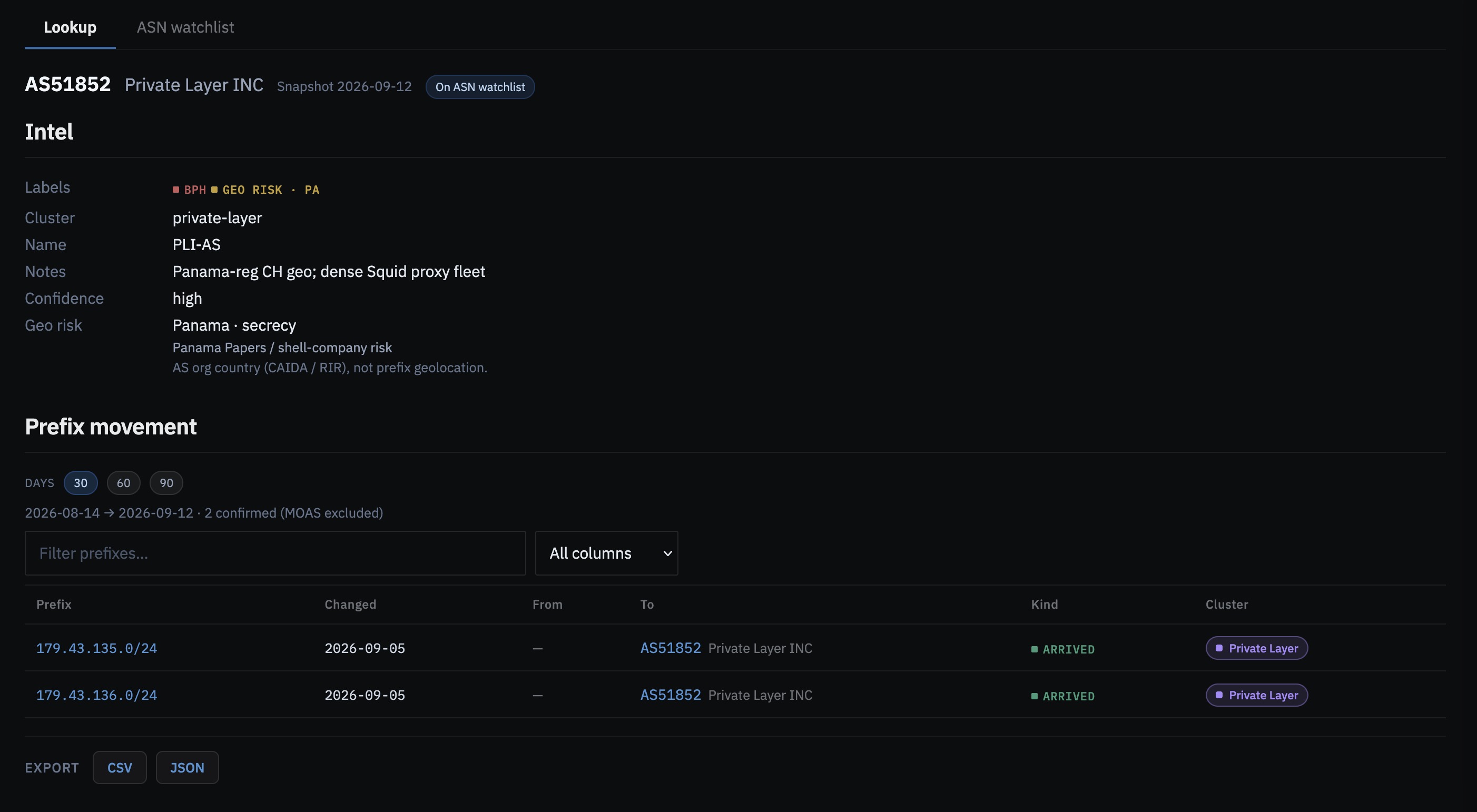
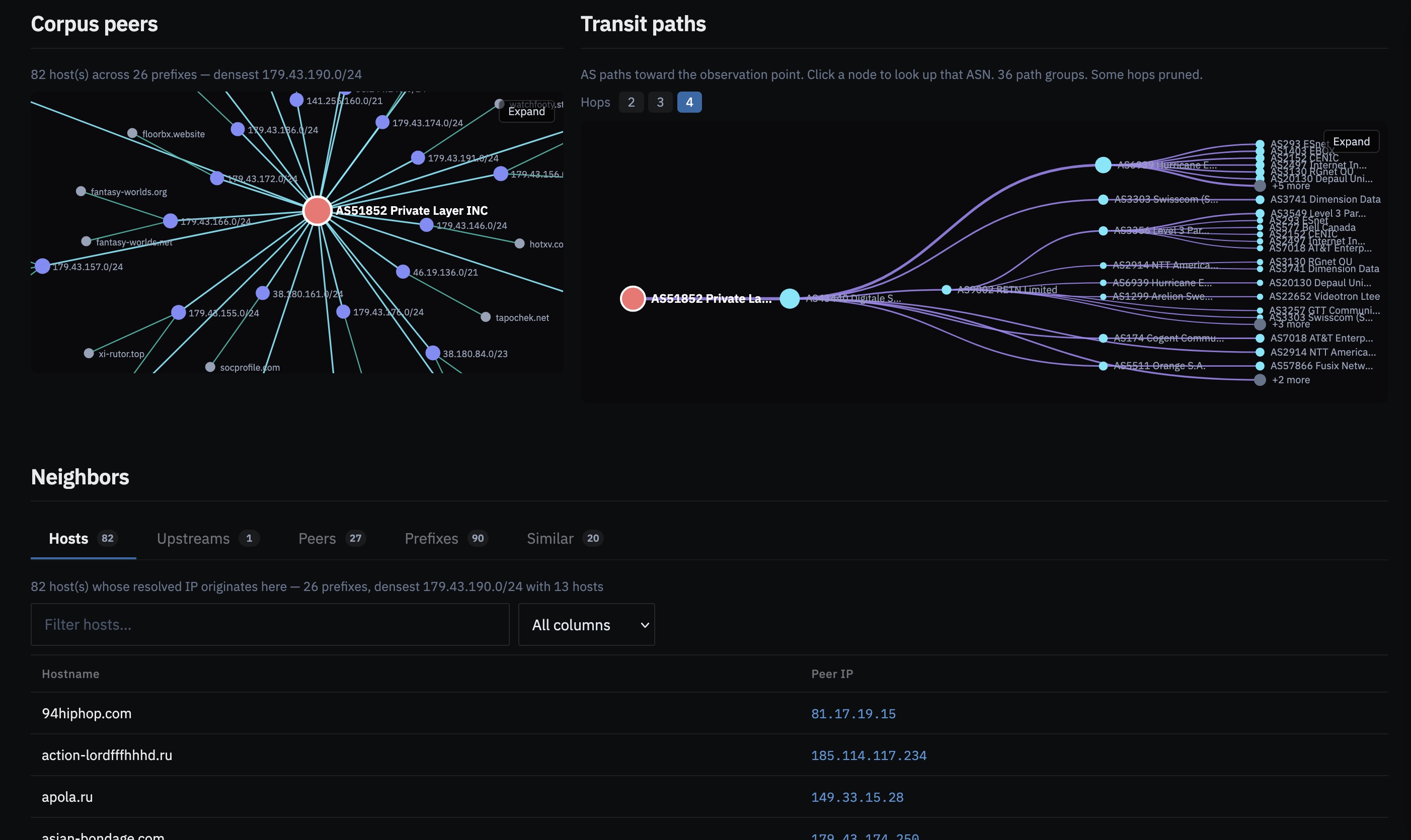
The result page shows the origin, the ASNs it peers with (its BGP neighborhood), and the Geo Risk country of the organization that operates the AS. If we’ve already tagged the origin (bulletproof hosting, known-bad, sanctioned, watch, historical, or adjacent) the tag appears here. Each ASN in the neighborhood graph is a link, so you can move through peers without starting a new lookup.
Co-located hosts from the corpus
The co-location map is the view we expect people to use most. It’s built from our crawl data rather than from a global routing table: it shows every hostname whose most recent IPv4 address (the older, four-octet form of IP address, which is what nearly all ad-tech infrastructure still uses) is originated by that ASN, laid out on the prefixes they share. A publisher you were looking at in isolation could turn out to share a /24 (a 256-address prefix) with several others, and an ad system you had no opinion on could be found hosted next to three domains that are already on a watchlist.
Prefix lookups add routing detail, including the origin on a given day, other ASNs announcing the same space, how widely the prefix is visible across the routing table, and whether it appears to be anycast (the same prefix announced from several places at once, as content delivery networks do). ASN lookups include a 30, 60, or 90-day prefix history showing which prefixes were added, withdrawn, or moved to a different origin, with the date the origin changed.
The ASN watchlist
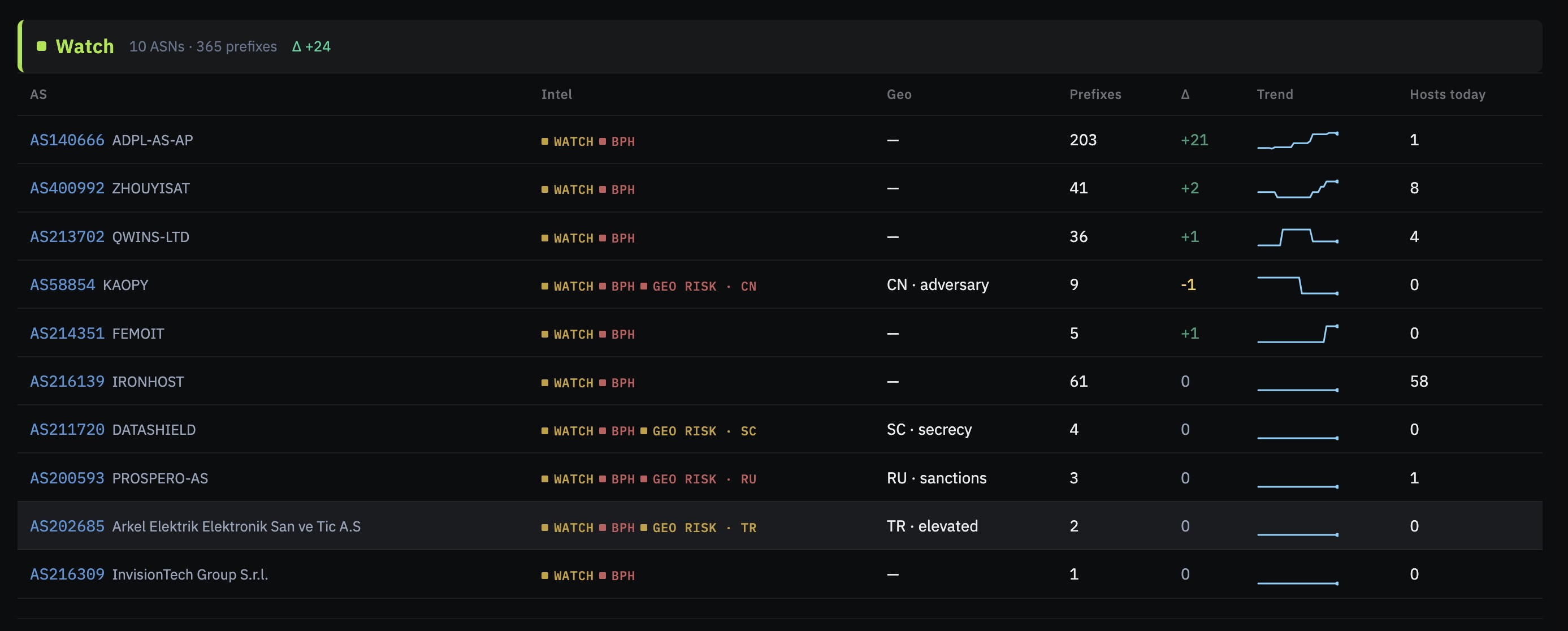
Research → ASN watchlist is a dashboard of the origins we’re already tracking, grouped by operator family and sorted by how much address space each one gained or lost in the window you choose. Everything on it is a prefix that changed origin in the routing data, so a listed move is a confirmed one.
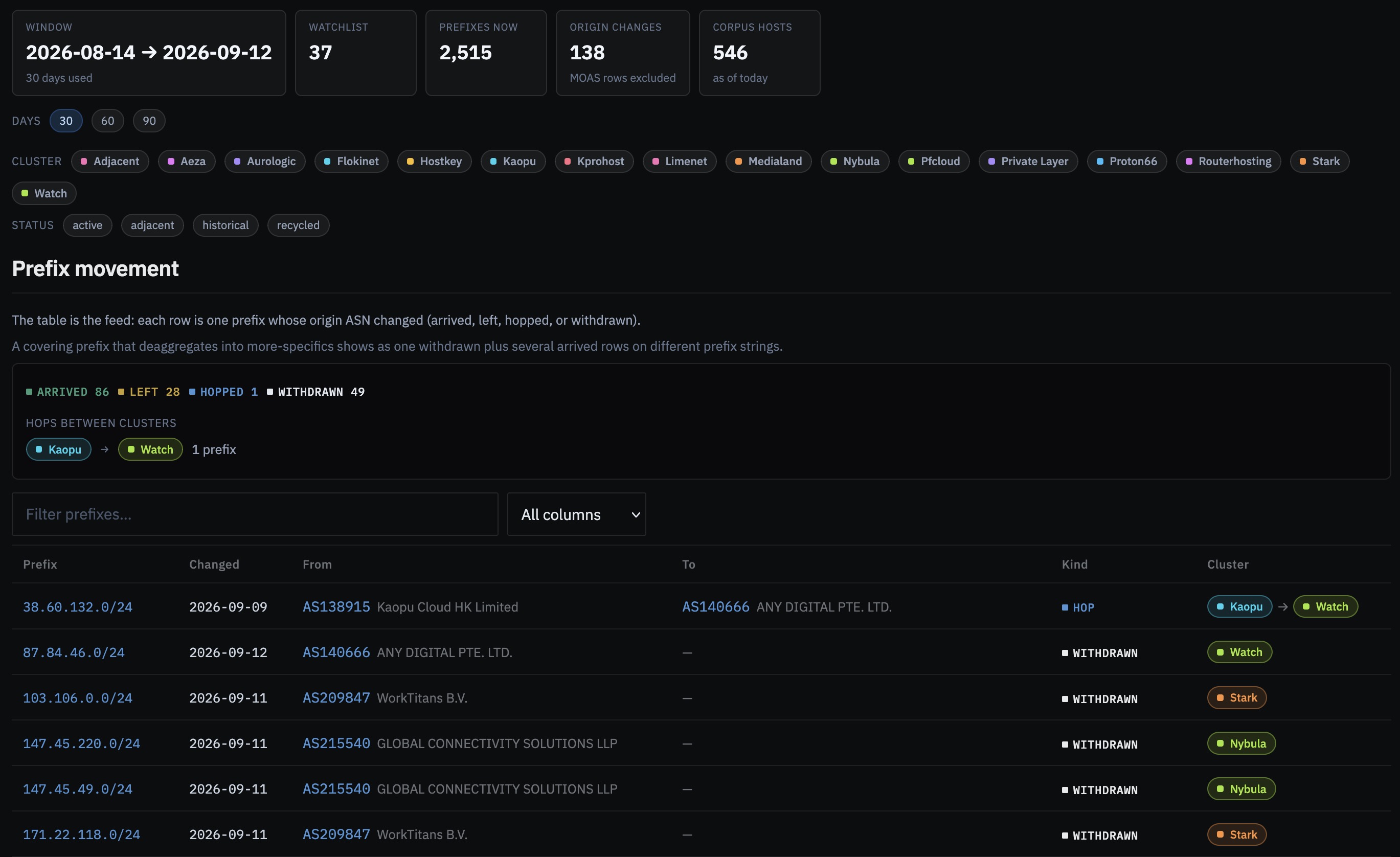
Most movement is internal to a family: a new ASN under the same operator picks up prefixes from a sibling, which usually means the operator is adding capacity. Opening a cluster shows which origins grew, which prefixes hopped between ASNs in the family, and when. Movement between clusters is rarer and more interesting, because it means address space has left a known operator for one you may not have looked at yet, and that usually deserves its own investigation.
Where ASN data appears in DecryptAds
Publisher and ad-system profiles now list the crawl IPv4 address and its origin ASN alongside the Domain Name System (DNS) and TLS data, and the ASN links straight to the explorer. We of course also have Whois Registrar data, and all of this can be combined to create advanced queries.
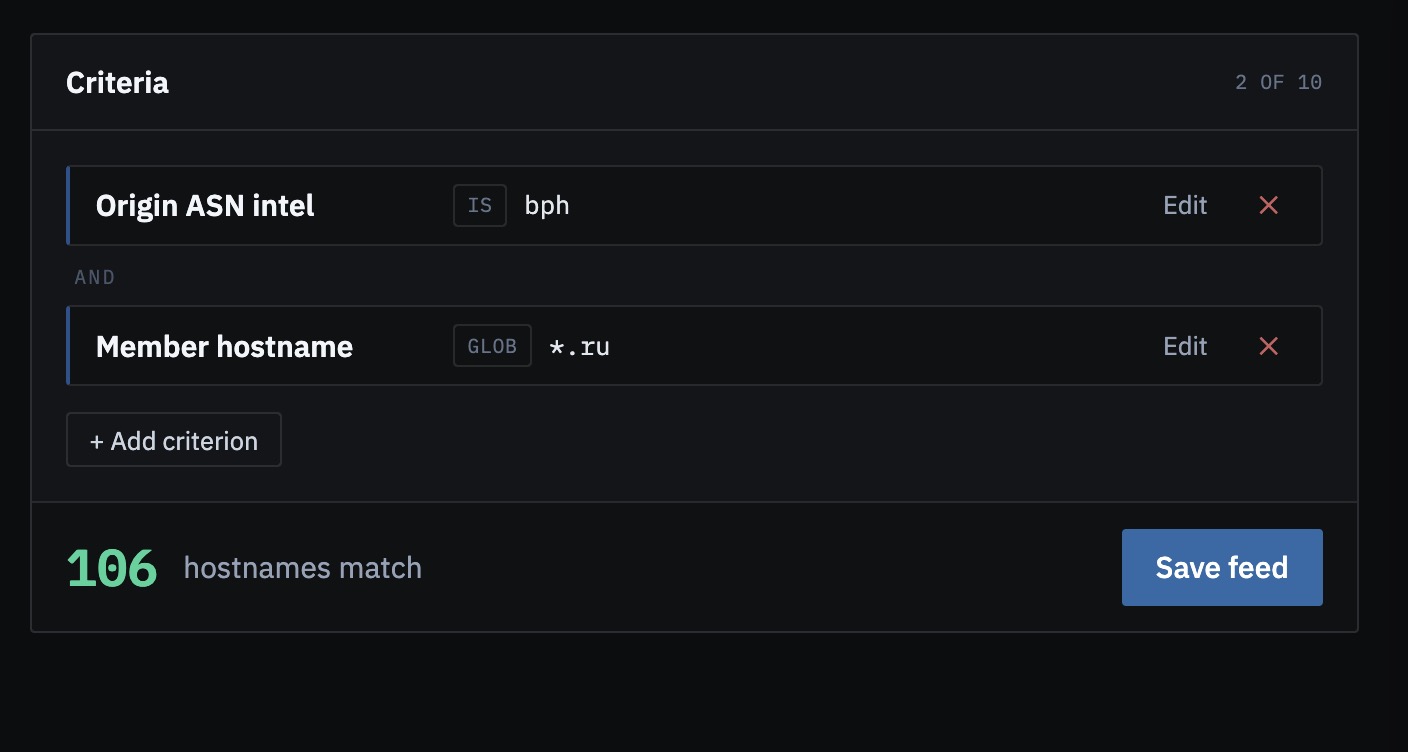
Feed Builder now accepts origin ASN, covering prefix, anycast status, and ASN intel tags as criteria, along with all the other fields we’ve created. A feed built on an origin ASN gives you every corpus hostname on that network, refreshed daily or weekly, with the hosts that entered and left since the last run. Before this, keeping that list current was a manual job.
Access and related tools
The new ASN explorer is at
decryptads.com/asnq
and the watchlist at
/asnq/watchlist.
Our API exposes the same data under
GET /asnq/*, and the
Model Context Protocol (MCP)
server, which lets an AI assistant query DecryptAds directly,
has origin_asn and asn_intel tools.
Available on the Researcher and Enterprise plans.
If you have any questions, challenges or a unique idea for using our ASN data, please reach out anytime via contact@decryptads.com. Happy hunting!